Fan Calibration & Health
Pankha Fan Control measures every fan it manages instead of assuming they all behave the same. Calibration teaches the backend what each fan can actually do; the health view then uses those measurements to tell you when a fan is drifting away from its healthy self. This page explains what gets measured, when runs happen, and how to read the results.
Why fans need calibrating
Section titled “Why fans need calibrating”Real fans are not linear:
- Dead zone - below some power level a fan does not spin at all. A fan told to run at 20% may just sit there while a naive dashboard reports “20%, all good”.
- Start/stop asymmetry - the power needed to start a fan from standstill is higher than the power needed to keep it spinning once started.
- Different ceilings - two fans set to 100% can differ by thousands of RPM.
Calibration measures, per fan:
| Measurement | Meaning |
|---|---|
| Starts at | Lowest power that reliably starts the fan from a standstill |
| Stops below | Lowest power that keeps it spinning once running |
| Speed range | Slowest and top speed in RPM |
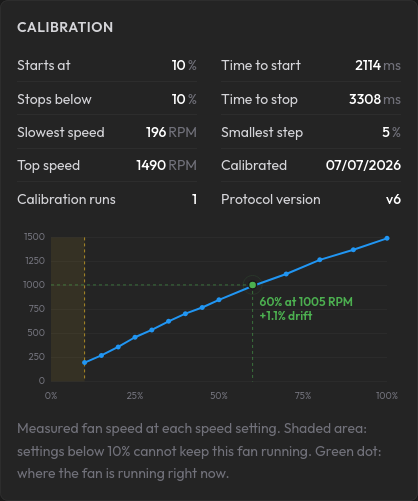
| Response curve | Actual RPM at each power step (the graph in the fan info card) |
| Time to start / stop | How quickly the fan reacts |
| Smallest step | The smallest power change that produces a real speed change |
With these facts, fan control skips the dead zone instead of crawling through it, never parks a fan at a power level where it silently stalls, and can tell “running as expected” from “something changed”.
When calibration runs
Section titled “When calibration runs”- Automatically, once you assign a profile to a fan. Assigning a profile is your consent to control that fan; unassigned fans are never touched automatically.
- After updates that change how measuring works. Old measurements are not comparable to new ones, so affected fans are re-measured once.
- Periodically, on the schedule you pick in Settings > General > Backend Settings > Fan Recalibration (default: every 7 days, or “Manual only” to disable).
- When a fan outperforms its records. If a fan sustains speeds above its known maximum (for example after you cleaned it or replaced it), its records are clearly stale and it is queued for a fresh measurement.
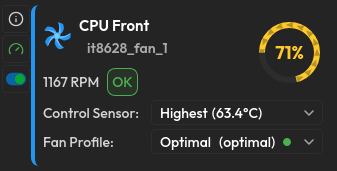
- Manually, any time, from the gauge icon next to a fan on its system card (Dashboard).
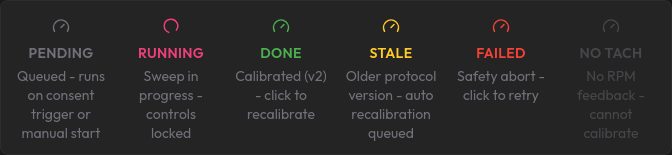
If a run fails (for example the system was too warm, or went offline mid-run), Pankha retries automatically when the system is next available - with growing pauses between attempts, and after that on the regular recalibration schedule. Nothing gets stuck waiting for you.
What a run looks like
Section titled “What a run looks like”---
title: Calibration Run Lifecycle
---
graph TD
Trigger([Trigger: assignment / schedule / manual]) --> Lock[Lock fan + CALIBRATING badge]
Lock --> Sweep[Sweep 100% down to 50%<br/>record RPM at each step]
Sweep --> Stall[Find the stop point<br/>power down until the fan stops]
Stall --> Start[Find the start point<br/>power up from standstill, hold to confirm]
Start --> Check{Result sanity check}
Check -->|pass| Save[Save + update healthy reference]
Check -->|suspect| SaveOnly[Save for control only]
Save --> Restore[Restore previous speeds + unlock]
SaveOnly --> Restore
style Lock fill:#d81b60,stroke:#333,color:#fff
style Restore fill:#2e7d32,stroke:#333,color:#fff
- The fan shows a CALIBRATING badge and its manual controls lock for the few minutes the run takes.
- The fan sweeps from full speed down through its range, then briefly stops and restarts a few times - that is the start/stop measurement, and it is expected.
- Other fans on the system keep running normally (they are held at a safe speed while a fan is deliberately stopped).
- Everything is restored afterwards: previous speeds, update rate, and normal profile control.

Safety first: a run aborts immediately if temperatures approach your emergency threshold, and an aborted run always restores the fan to its previous state.
Trustworthy measurements
Section titled “Trustworthy measurements”Real hardware lies in creative ways, so every reading has to earn its place:
- A speed reading only counts once it is stable across several samples - a fan mid-ramp cannot fake a measurement.
- A “start” only counts if the fan is still spinning after a sustained hold - a brief twitch of the blades does not count as starting.
- A reading only counts while the fan is actually at the power level Pankha commanded. Some systems have firmware or drivers that quietly move fans on their own (the Raspberry Pi’s built-in fan logic and some GPU drivers do this); those samples are detected and discarded, and the run notes how many it threw away.
- After a run, the result is sanity-checked (does speed rise with power? is the peak at full power? is the ceiling believable?). A run that fails the check still works for fan control, but it is never allowed to redefine what “healthy” means for that fan.
The fan info card
Section titled “The fan info card”The info button next to each fan opens its card:

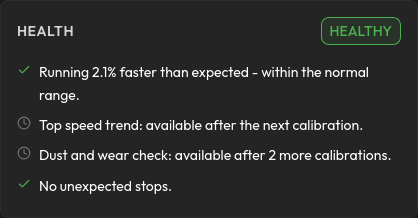
- Health - a verdict chip plus four plain-language checks (see below).
- Calibration - the measured facts and the response graph. The shaded area is the dead zone; the green dot is where the fan is running right now, including how far it is from the expected speed.
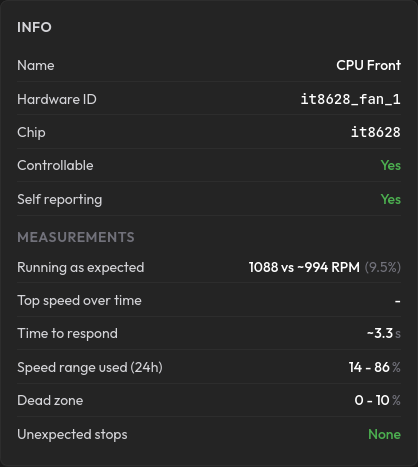
- Info - identity details and measurements, including the dead zone range and a count of unexpected stops (with a Clear button once you have fixed the cause).
- How this works - a short recap of this page, inside the app.
Copy All copies exactly what the card shows, for sharing or support.
Health checks, in plain terms
Section titled “Health checks, in plain terms”Health compares the fan against its own best self - the best measurements it has ever produced - never against other fans. The verdict chip shows the worst of four checks:
| Check | What it means | When it complains |
|---|---|---|
| Running as expected | Live speed vs. the calibration curve, judged over 10 minutes - never on a single reading | Sustained running slower (dust, obstruction) or faster (stale records) than measured |
| Top speed | Latest measured ceiling vs. the best on record | A falling ceiling - dust buildup is the usual cause |
| Dust and wear | Trend across at least 3 calibration runs | Top speed falling and/or the fan getting slower to start |
| Unexpected stops | The fan read 0 RPM while being told to spin | Check the cable if it keeps happening |
A fan’s healthy reference never gets dragged down by recalibrating a dusty fan - degradation is a condition, not a new normal. It upgrades automatically the first time a run beats it (for example after cleaning).
You do not have to open the info card to notice a problem: when a health check degrades, the fan’s badge on its card changes to Attention (yellow) or Check fan (red), with the reason in its tooltip. Healthy fans keep their normal badge - no news is good news.
Good to know
Section titled “Good to know”- Fans without a speed sensor (no tach wire) cannot be measured. They are marked accordingly and simply behave as they always did.
- Calibration runs count in the card tells you how many measurements the trend checks are working with; wear verdicts need at least 3.
- Calibration measures hardware facts - your own min/max speed limits on a fan are always respected and never overwritten.

Next Steps
Section titled “Next Steps”- Fan Profiles & Logic: the curves that calibration makes trustworthy.
- Dashboard: where the badges, gauge icon, and fan info card live.
- Settings: the recalibration schedule.
- Troubleshooting: failed or stuck calibration runs.